If you are looking to elevate your handmade crochet business, design custom product packaging, or add high-end finishing touches to your garments, a heavy-duty cutting machine is a total game-changer. Fiber artists everywhere are dropping the scissors and using digital cutters to slice through thick leather garment labels, custom wood tags, fabric shapes, and custom stencils.
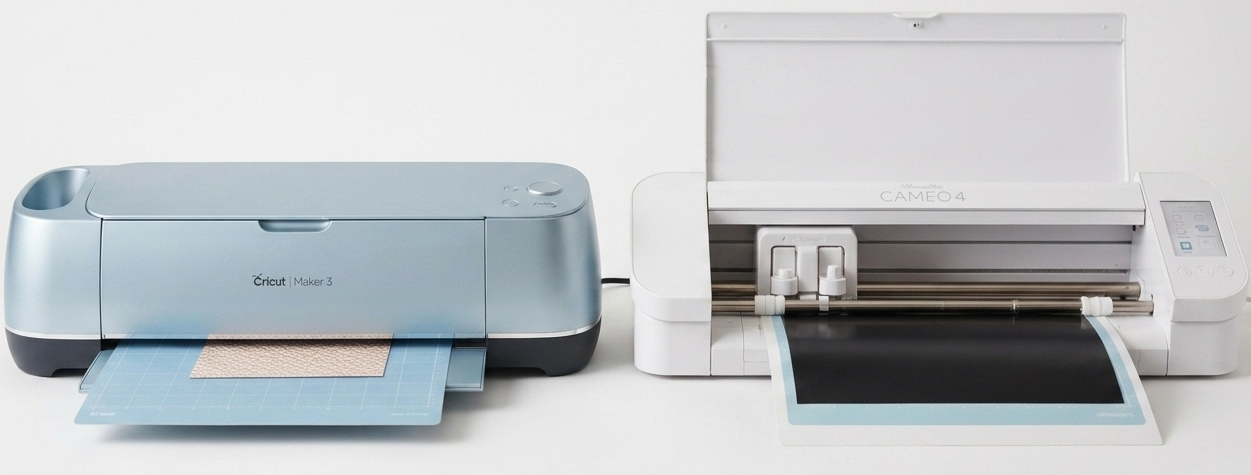
But when you are ready to make a high-ticket investment, two giant names dominate the space: the Cricut Maker 4 (retailing around $379) and the Silhouette Cameo 4 (retailing around $299).
To help you protect your studio budget, I bypassed the glossy marketing videos and combed through hundreds of real forum rants, software complaints, and mechanical reviews. Here is the unvarnished truth about how these machines handle real-world crafting.
What Real Buyers Are Actually Saying
To cut through the commercial hype, here is the unfiltered feedback from real crafters who have used these machines for long-term production.
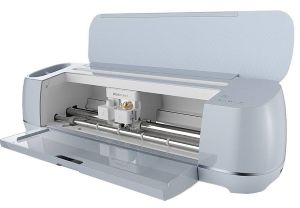
🐊 The Cricut Maker 3
🟢 The Good (What People Love)
- Flawless Fabric Cutting: “The commercial-grade rotary blade is incredible. It glides through unbacked fabric like a dream without fraying, which is a lifesaver for sewing projects.”
- Beautiful, Polished Build Quality: “The machine feels heavy-duty and luxurious. The top tray opens up beautifully with a slow-motion fluid glide, and it looks elegant sitting on a craft desk.”
- Incredibly Quiet Operation: “It is whisper-quiet while cutting. I can comfortably run projects late at night while my family is sleeping in the next room without any noise issues.”
- Perfect for Tech Beginners: “Cricut Design Space is so simple that a child could figure it out. It is very user-friendly if you just want to upload an image and press cut.”
🔴 The Bad (The Honest Complaints)
- Aggressive Monthly Subscription Nudges: “I hate how heavily they push Cricut Access. The software feels like it constantly restricts basic fonts and shapes behind a monthly paywall.”
- Mandatory Internet Connection: “The software is heavily cloud-based. If your home internet goes down, or if the Cricut company servers crash, your expensive machine becomes completely useless.”
- Rigid Software Limitations: “Design Space is incredibly basic. You cannot easily modify shapes or create complex layouts from scratch; it forces you to use other programs and import them.”
- Wasted Material Costs: “The ‘Matless Smart Materials’ feature is mostly an expensive gimmick. The machine leaves long, mandatory margins at the ends, which ends up wasting a ton of expensive vinyl.”
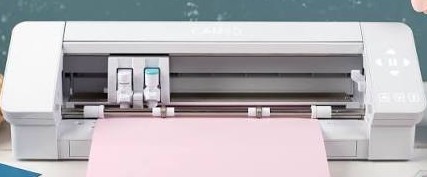
📐 The Silhouette Cameo 4
🟢 The Good (What People Love)
- Total Design Software Freedom: “Silhouette Studio is a powerhouse vector program. You have total creative freedom to build, stretch, and weld designs directly on your workspace without paying a monthly fee.”
- True Offline Functionality: “I love that this machine operates 100% offline. The software lives on my computer, meaning no corporate server updates can block me from completing my work.”
- Superior Material Thickness: “The 3mm clearance means I can easily feed thick genuine leather sheets through to cut heavy-duty tags for my handmade items without jamming.”
- Convenient Built-In Roll Feeder: “The integrated roll feeder is fantastic. You can load giant, cheap generic vinyl rolls directly into the back without a mat and cut up to 10 feet continuously.”
🔴 The Bad (The Honest Complaints)
- Intolerably Loud Grinding Noises: “It sounds like a robotic screeching printer while cutting. The grinding noises are so loud that you cannot hold a normal conversation or watch TV in the same room.”
- Steep Software Learning Curve: “The software interface is incredibly overwhelming at first glance. If you aren’t familiar with graphic design programs, get ready to spend hours watching tutorials.”
- Hidden Software Upgrade Fees: “It feels incredibly cheap that the base free software blocks you from importing standard web files (.SVG). You are forced to pay a one-time $50 upgrade just to unlock basic vector support.”
- Finicky Manual Adjustments: “Unlike Cricut which sets your blade automatically, the Silhouette requires constant manual tweaking of blade depth and pressure settings to prevent tearing materials.”
🏆 The Final Consensus: Splurge or Save?
Both machines offer high-power cutting capabilities, but they target two entirely different workflows.
Buy the Cricut Maker 3 if you value quiet operation, beginner-friendly software, and want an out-of-the-box luxury appliance that excels at cleanly slicing delicate fabrics and basic garment tags without a steep learning curve.
Buy the Silhouette Cameo 4 if you are building a high-volume craft business, want to escape monthly subscription fees, need to slice through heavy leather, and prefer a powerful design application that lets you work completely offline without internet restrictions.
More Honest Reviews:
Is the Dreambox3 Really the Best Yarn Storage Cabinet? Read the review here.
Furls Crochet Hooks or Clover Amour? Who wins this review? Find out here.
The Best Economy Yarn – Red Heart Super Saver? The Big Three face off here.
Affiliate & Transparency Disclosure
I believe in total honesty with my crafting community. This review contains affiliate links. If you click on some of the links in this post—such as the link to the Sauder Sewing Armoire—and make a purchase, I may earn a small commission at no extra cost to you. Please note that I am not directly affiliated with Create Room, and links to the DreamBox 3 are provided for informational and price-comparison purposes only. I only recommend products and storage solutions that I truly believe add value to your creative space. Thank you for supporting my work and helping me keep this site runnin
You May Also Like